
Choose where your workspace's data lives
A customer contract or GDPR may require that your team’s messages never leave the EU, or the US. Freesbe asks where to store a workspace’s data on the page where you name it, and the choice is free on every plan. This shows what to pick, what the guarantee covers, and how to check and change it afterwards. Whoever creates the workspace makes the choice; owners and admins can see it later.
1. Pick the region at sign-up
Section titled “1. Pick the region at sign-up”On the Create your workspace page, under Where should we store your data?, Freesbe preselects the region closest to you. Change it if you need a guarantee:
| Region | What you get |
|---|---|
| European Union | Guaranteed: data centers in the EU only, never leaves the region. |
| United States | Guaranteed: data centers in the US only, never leaves the region. |
| Asia-Pacific | Close to your team, for speed: placed in data centers in Asia, but can be stored elsewhere when needed. |
| Oceania | Close to your team: placed in data centers in Australia and New Zealand, but can be stored elsewhere when needed. |
Choose European Union or United States when you need data residency; choose Asia-Pacific or Oceania when your team is far from both and you want Freesbe as fast as possible.
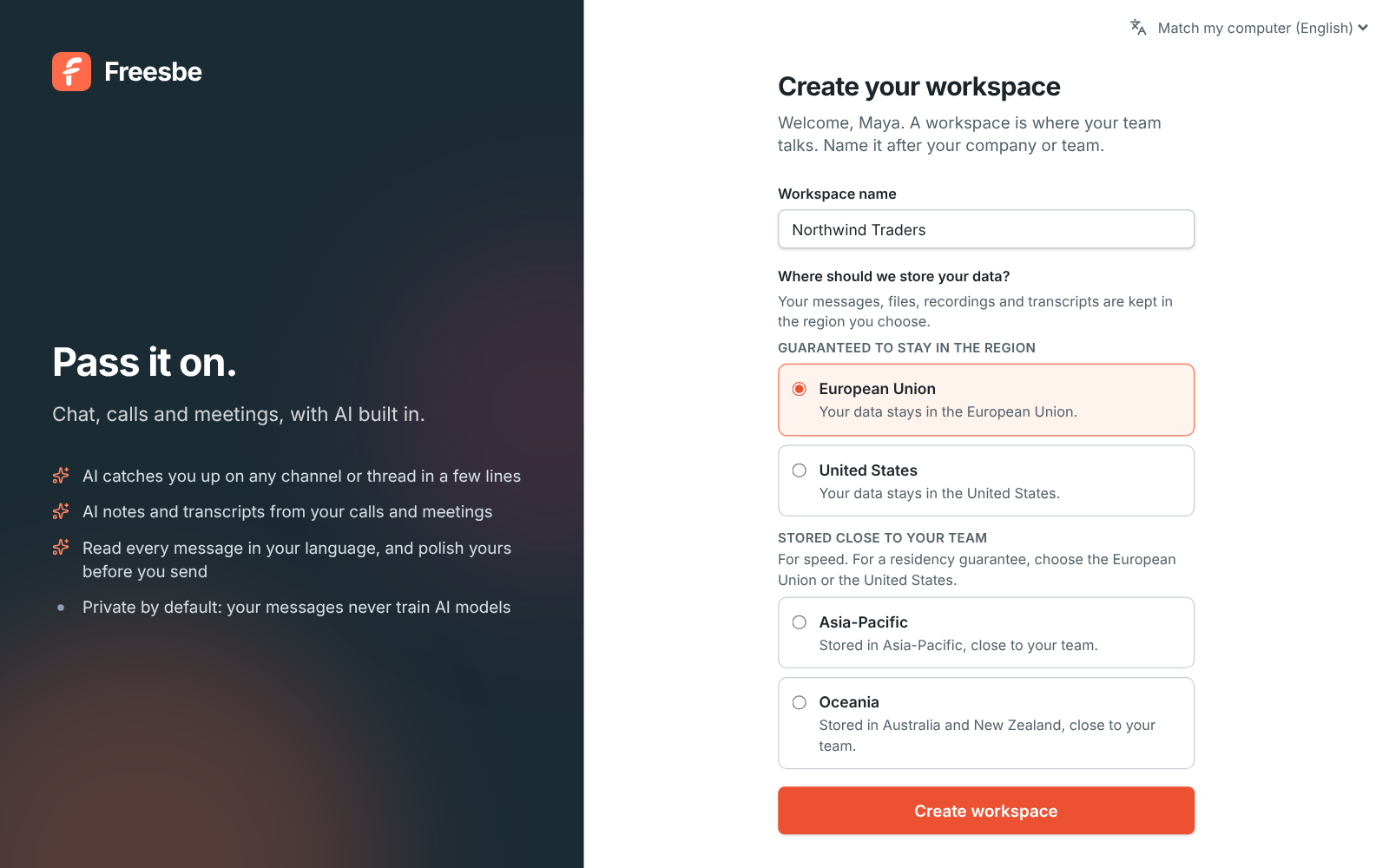
The region is set when the workspace is created, so decide before the first message. If you’re rolling Freesbe out, this is the one thing to settle before signing up.
2. Know what the guarantee covers
Section titled “2. Know what the guarantee covers”Everything your team makes stays in the region:
- Messages, threads, reactions, mentions, drafts and scheduled messages, and search across them
- Files and images people share, and the workspace logo
- Huddle and meeting recordings, transcripts and AI notes
- Meetings, meeting chat, canvases, and the live state of huddles
- Slack imports, and backups of all of the above
Some things work across regions by nature, so you can answer the question before it’s asked:
- Your account: your name, email, sign-in details, billing details and the list of workspaces you belong to are kept in one place, so one account can be in workspaces in different regions.
- Live calls: audio and video travel through the server nearest to the people in the call and are never stored there. The recording is stored in your region.
- AI: a summary, translation or AI notes sends the text to our AI provider to be processed, and transcripts are made by our speech-to-text provider; neither keeps it. Admins can turn AI features and transcripts off under Workspace settings → General → AI & workflows and Calls & meetings → Recordings.
- Services you connect: push notifications, emails Freesbe sends, payments, phone calls and the apps and integrations you turn on follow those services’ own rules.
3. Check it later
Section titled “3. Check it later”Owners and admins see the region in the Admin Center under Workspace → Data region, with a line saying the data stays there. That’s the page to screenshot for a customer’s security questionnaire.
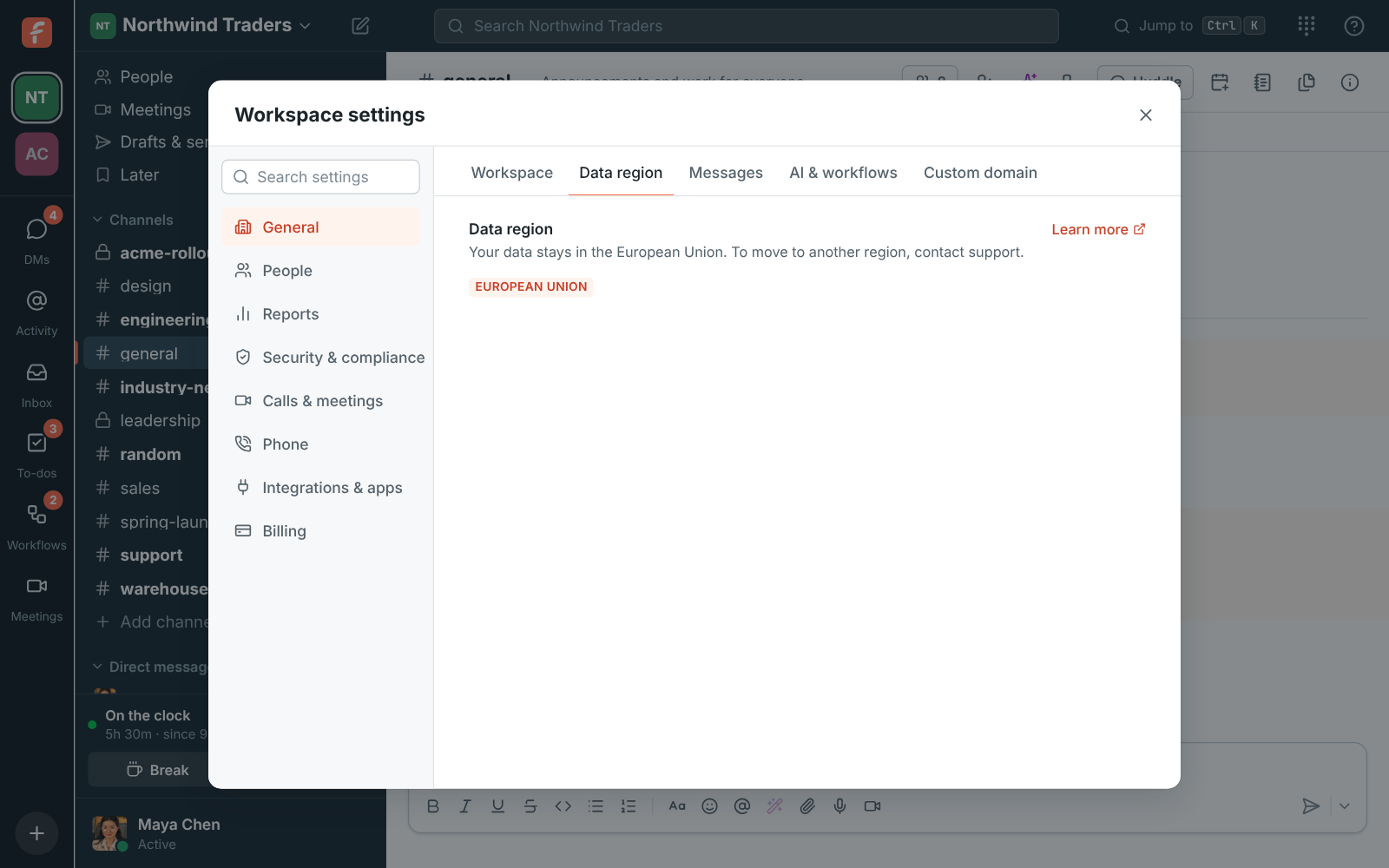
A workspace created before you could choose a region shows Not chosen. Contact support to move it to the region you want.
If you need to move
Section titled “If you need to move”The workspace owner contacts support. We copy everything to the new region and check it, then switch the workspace over, at a time agreed with you. While it’s being copied the workspace is read-only: everyone can still read messages and open files, but sending, uploading and editing canvases wait. It usually takes a few minutes, longer with many hours of recordings. Moving is free once a year on Business and Corporate, and whenever you need it on Enterprise.
- Export a copy of your data any time from Security → Export data in the Admin Center. See Export your data.
- One account can belong to workspaces in different regions, so a guest from a US workspace can join your EU one without a second account.
See Data residency for the full lists.
Answers come from the Freesbe guides and are written by AI, so check the linked guide before relying on one. Please don't include personal details such as emails or passwords.